A Good Reason to NOT Copy and Paste Code

Many beginners are advised to “type code yourself instead of copy-pasting” because it enables one to internalize the process and the code more quickly. But as programmers gain more experience and attain the level where they need to get things done rather than ensure they learn, they get comfortable with CTRL+C, CTRL+V from Stack Overflow and other sources. As an experienced developer, I recently saw first-hand why I should never copy and paste any code I found online (or anywhere, for that matter)
Consider the code below:
const [ ENV_PROD, ENV_DEV ] = [ 'PRODUCTION', 'DEVELOPMENT'];
const environment = 'PRODUCTION';
function isUserAdmin(user) {
    if(environmentǃ=ENV_PROD){
        return true;
    }
    return false;
}
isUserAdmin();
Looks benign, right? And we would expect this code to always return false, yes? Unfortunately, no. Now open a browser console, copy this code, and paste in the console. You may be shocked that it returns true. 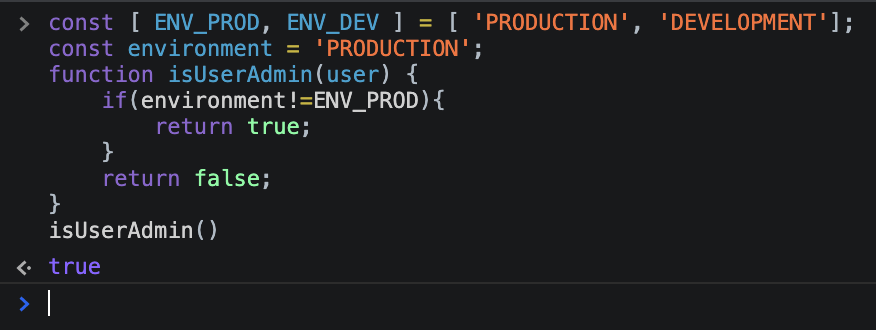
To cut the long story short, what looks like a loose inequality check on line #4, is deceptively an assignment operation, which reads like (environmentǃ = ENV_PROD)! In JavaScript, assignment operations return the assigned value, which in this case is truthy (will be treated as true wherever a boolean value is expected) 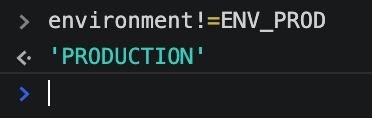
But isn’t environmentǃ an invalid variable name in JavaScript, you ask? It’s complicated. You’d be right to say an exclamation sign cannot be part of a variable name. However, the ǃ you see there is in fact not the everyday exclamation sign you know. It’s an obscure character that happens to be accepted as regular text by the JavaScript interpreter, and thus can be a valid part of a variable name
So while a programmer looks at line #4 and sees environment != ENV_PROD, the JavaScript interpreter sees environmentǃ = ENV_PROD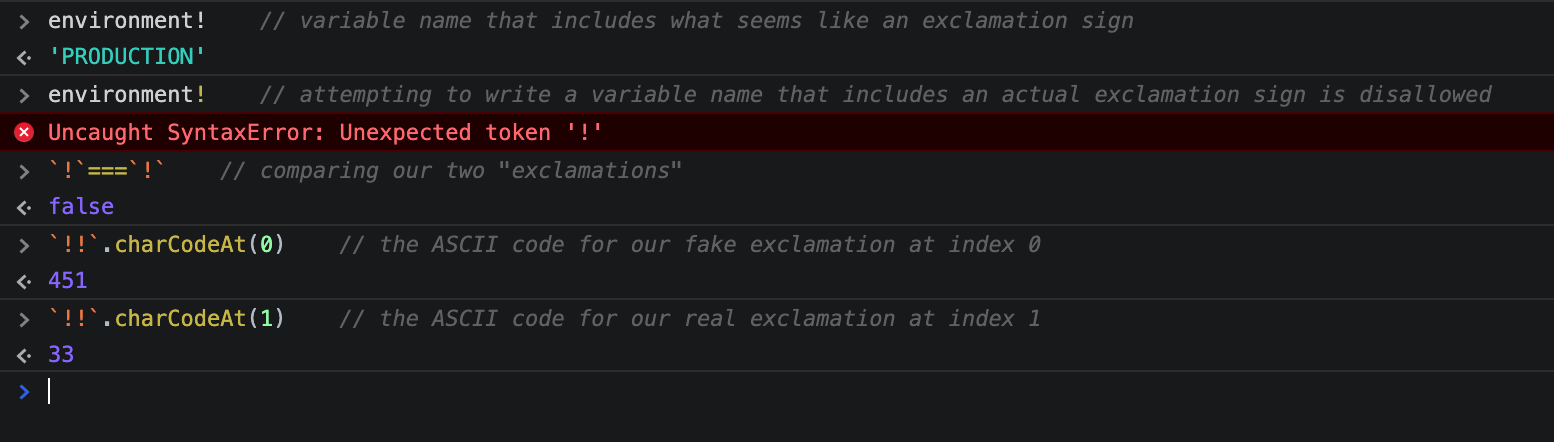
There! I hope this is a compelling enough reason to not take copy-pasted code lightly. And I hope you see how typing code snippets yourself can save you from bugs that hide in plain sight!